
YouTube MCP server for video transcripts
Add TranscriptClip to Claude, ChatGPT or Cursor as a YouTube MCP server. Paste a YouTube, TikTok or Instagram link in the chat and the assistant reads the full transcript before it answers.
MCP server URL
https://transcriptclip.com/api/mcp
Copies the setup as Markdown. Paste it into Claude Code, Cursor or any chat and the assistant walks you through it.
- Claude, ChatGPT, Cursor and other MCP clients
- Sign in with your TranscriptClip account
- 30 free credits when you sign up
Connect the YouTube MCP server
Pick your assistant. Each one needs the MCP URL and one sign-in to TranscriptClip.
- 1
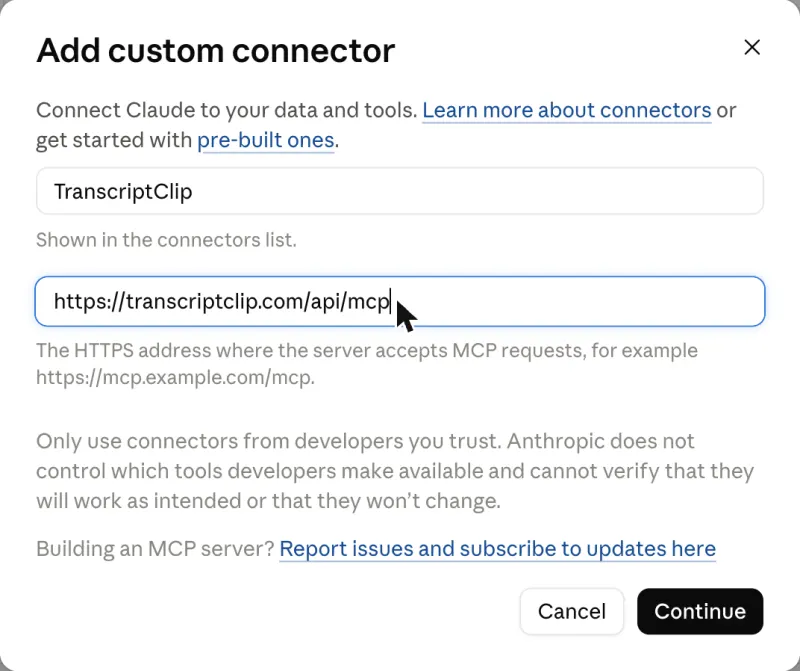
In Claude on the web or desktop, open Customize → Connectors, then + Add → Add custom connector.
- 2
Name it TranscriptClip, paste this MCP URL, press Continue, then Add. Leave the sign-in options as Claude detects them.
https://transcriptclip.com/api/mcp
- 3
Press Connect, sign in to TranscriptClip and press Allow. Claude asks before each transcript; pick Always allow to skip that.
YouTube MCP prompts to copy
Paste a link and ask in plain words; the assistant picks the transcript tool by itself.
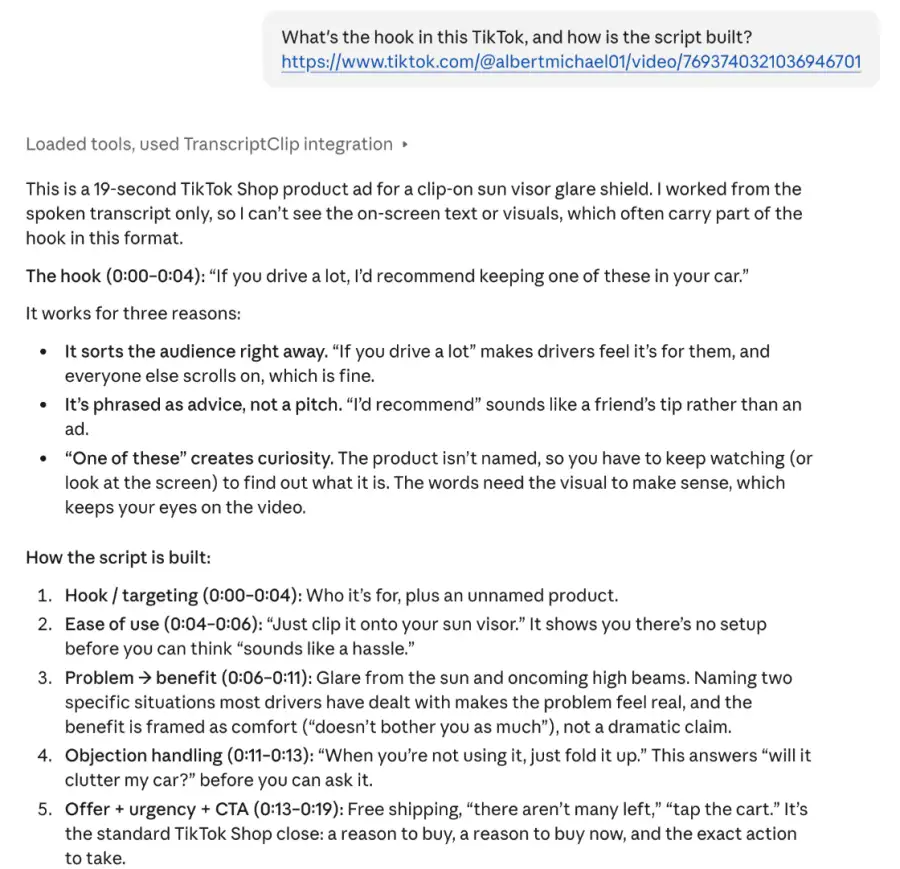
“What's the hook in this TikTok, and how is the script built? [TikTok link]”
The first lines of the transcript are the hook; the assistant names the pattern.
“Summarize this video in five bullets: [YouTube link]”
Covers the whole video, not just the title and description.
“Turn this Reel into a script for [your product]: [Instagram link]”
Same structure as the original, your offer and your words.
“Put the opening line of each video into a hook swipe file, grouped by type: [link 1] [link 2] [link 3]”
One transcript per link, one list you can keep.
“Give me the transcript with timestamps: [video link]”
Every line starts with its time, like [01:24].
“How many TranscriptClip credits do I have left?”
The MCP server checks your account.
YouTube MCP server FAQ
What is a YouTube MCP server?
MCP (Model Context Protocol) is the open standard AI assistants use to call outside tools. A YouTube MCP server gives the assistant a tool for YouTube. Ours does one job: it turns a video link into a transcript, so Claude, ChatGPT or Cursor can summarize, quote or rewrite what was said without you copying text from another tab.
Which AI assistants work with it?
Claude on the web, desktop and phone, ChatGPT with developer mode turned on, Claude Code and Cursor. Any other MCP client that supports remote servers with OAuth sign-in works the same way: give it the MCP URL and sign in to TranscriptClip when it asks. The setup steps for each assistant are at the top of this page.
Is it free? How much does a transcript cost?
New accounts get 30 free credits, with no card needed. After that a transcript costs 1 credit per started minute of video, the same as on the site: a 45-second TikTok is 1 credit, an 8-minute YouTube video is 8. Failed requests cost nothing. Monthly plans start at $5.90 for 300 minutes, and one-time packs start at $4.90 and never expire.
Do I need a YouTube API key or a Google Cloud project?
No. The MCP server is hosted by us and fetches videos on its own, so there is nothing to install, no Google Cloud project to create and no YouTube Data API quota to watch. You paste the MCP URL into your assistant, sign in to TranscriptClip once and press Allow. That sign-in is the only setup.
Does it work on videos without captions?
Yes. If the creator uploaded captions, you get those. If a video has no captions, or only YouTube's automatic ones, we transcribe the audio with speech recognition instead, so you still get the full transcript. That matters most for Shorts, TikToks and Reels, which rarely carry captions.
Does it work for TikTok and Instagram too?
Yes. The same tool takes TikTok links (full and short vm.tiktok.com links), Instagram Reels and video posts, videos on X and Facebook, and RedNote notes copied with the Share button. Videos must be public and up to 10 minutes long. The transcript comes back in the language spoken in the video; ask the assistant if you need a translation.
Can it upload videos, read comments or pull channel stats?
No. It only reads what is said in a public video. It can't upload or edit videos, read comments, open private videos or pull channel analytics, and it never signs in to your YouTube or TikTok account. For uploads and stats you need the platform's own API or a tool such as YouTube Studio.
What can the assistant see in my TranscriptClip account?
When you press Allow, the assistant gets permission to fetch transcripts and spend your credits on them, nothing else. It can't see your password, payment details or account settings, and we never see your chat, only the link it sends. Every connected assistant is listed under Settings, then API & Connected apps, where Disconnect cuts its access at once.
Why does Claude ask before every transcript?
Claude asks before running a tool that can spend something, and a transcript spends credits. When the prompt appears, choose Always allow to stop the question for TranscriptClip, or Allow once to keep approving each video. You can change it later in Customize, then Connectors, then TranscriptClip, where each of the two tools has its own setting.
How is it different from a self-hosted YouTube transcript MCP?
Open-source YouTube transcript MCP servers run on your own machine and read YouTube captions, which is free and fine for a few videos. They return nothing when a video has no captions, can't open TikTok or Instagram links, and stop working when YouTube blocks your IP. Ours is hosted, transcribes the audio and covers six platforms, for credits.
Is there a length limit?
Yes: 10 minutes per video, on the site and through MCP. That covers TikToks, Reels, Shorts and most clips, but not full podcasts or long YouTube videos yet. If you paste a longer video, the assistant gets a one-line message saying so and no credit is spent, so it's safe to try.
Which languages does it understand?
The spoken language is detected automatically, and the transcript comes back in that language; we never translate it. If detection guesses wrong, the assistant can pass a language code to get_transcript, such as es for Spanish or pt for Portuguese. More than 20 languages are supported, including English, Spanish, Portuguese, Hindi, Japanese and Korean.